 pax
bbf0d3107b
pax
bbf0d3107b
behavior change: a single mid-call network drop could previously
poison _batch_api_works=False for the whole site, forcing every
future ensure_categories onto the slower HTML scrape path. _do_ensure
now routes the unprobed case through _probe_batch_api, which only
flips the flag on a clean HTTP 200 with zero matching names; timeout
and non-200 responses leave the flag None so the next call retries
the probe.

The bug surfaced because fetch_via_tag_api swallows per-chunk
failures with 'except Exception: continue', so the previous code
path couldn't distinguish 'API returned zero matches' from 'the
network dropped halfway through.' _probe_batch_api already made
that distinction for prefetch_batch; _do_ensure now reuses it.

Tests in tests/core/api/test_category_fetcher.py pin the three
routes (transient raise, clean-200-zero-matches, non-200).
booru-viewer

A booru client for people who keep what they save and rice what they run.
Qt6 desktop app for Linux and Windows. Browse, search, and archive Danbooru, e621, Gelbooru, and Moebooru. Fully themeable.
Screenshot
Linux — Styled via system Qt6 theme
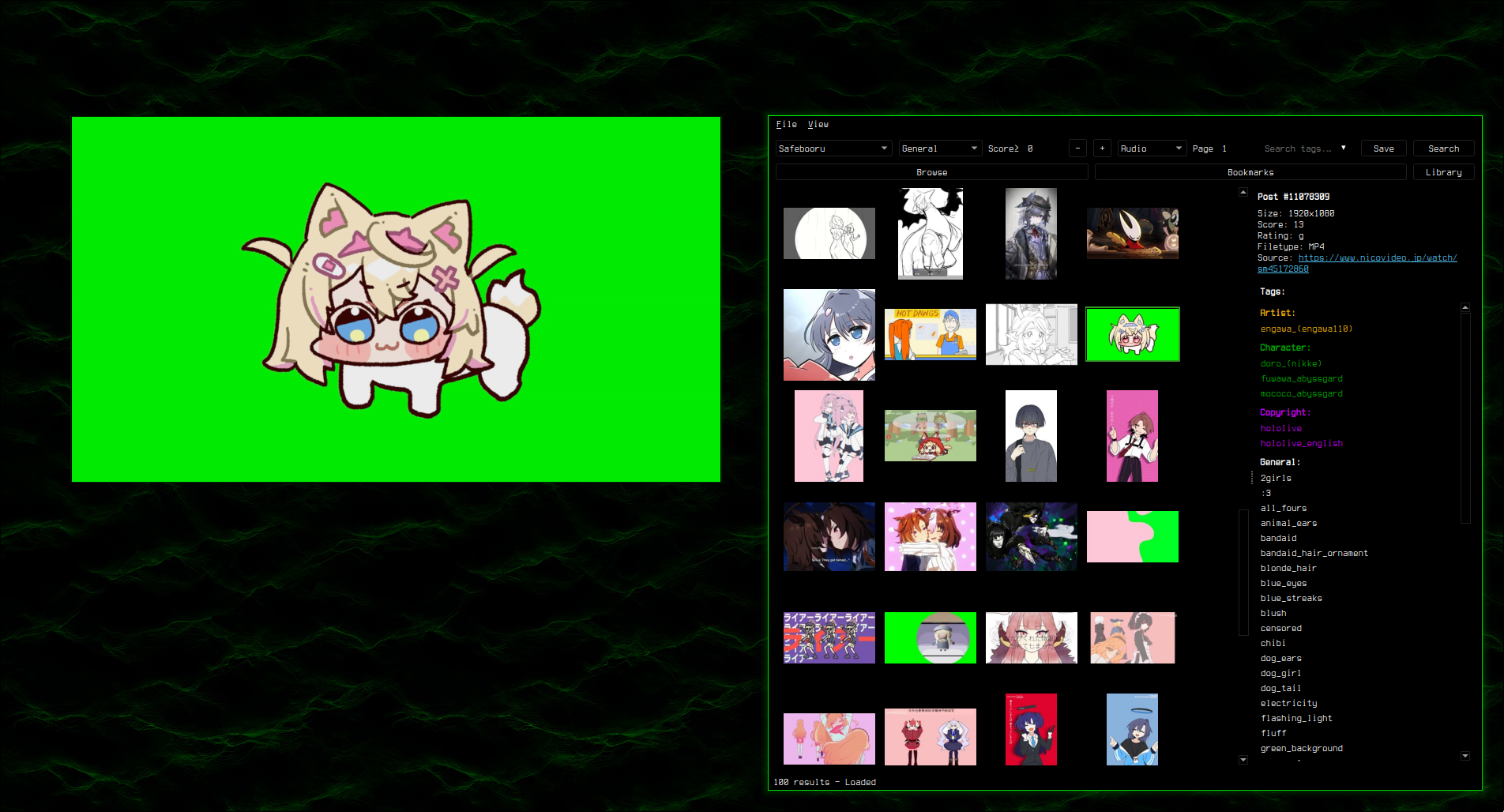
Supports custom styling via custom.qss — see Theming.
Features
booru-viewer has three tabs that map to three commitment levels: Browse for live search against booru APIs, Bookmarks for posts you've starred for later, Library for files you've actually saved to disk.
Browsing — Danbooru, e621, Gelbooru, and Moebooru. Tag search with autocomplete, rating/score/media-type filters, blacklist with backfill, infinite scroll, page cache, keyboard grid navigation, multi-select with bulk actions, drag thumbnails out as files.
Preview — Image zoom/pan, GIF/APNG/WebP animation, video via mpv (stream from CDN, seamless loop, seek, volume), ugoira auto-conversion, color-coded tag categories in info panel.
Popout — Dedicated viewer window. Arrow/vim keys navigate posts during video. Auto-hiding overlay UI. F11 fullscreen, Ctrl+H hide UI, Ctrl+P privacy screen. Syncs bidirectionally with main grid.
Bookmarks — Star posts for later. Folder organization, tag search, bulk save/remove, JSON import/export.
Library — Save to disk with metadata indexing. Customizable filename templates (%id%, %artist%, %md5%, etc). Folder organization, tag search, sort by date/name/size.
Search — Inline history dropdown, saved searches, session cache mode.
Install
Windows
Download booru-viewer-setup.exe from Releases and run the installer. It installs to AppData with Start Menu and optional desktop shortcuts. To update, just run the new installer over the old one. Your data in %APPDATA%\booru-viewer\ is preserved.
Github: /pxlwh/booru-viewer/releases
Gitea: /pax/booru-viewer/releases
Windows 10 dark mode is automatically detected and applied.
Linux
Arch / CachyOS / Manjaro — install from the AUR:
yay -S booru-viewer-git
# or: paru -S booru-viewer-git
The AUR package tracks the gitea main branch, so yay -Syu pulls the latest commit. Desktop entry and icon are installed automatically.
AUR: /packages/booru-viewer-git
Other distros — build from source. Requires Python 3.11+ and Qt6 system libraries.
Ubuntu / Debian (24.04+):
sudo apt install python3 python3-pip python3-venv mpv libmpv-dev
Fedora:
sudo dnf install python3 python3-pip qt6-qtbase mpv mpv-libs-devel
Then clone and install:
git clone https://git.pax.moe/pax/booru-viewer.git
cd booru-viewer
python3 -m venv .venv
source .venv/bin/activate
pip install -e .
booru-viewer
To add a launcher entry, create ~/.local/share/applications/booru-viewer.desktop:
[Desktop Entry]
Name=booru-viewer
Exec=/path/to/booru-viewer/.venv/bin/booru-viewer
Icon=/path/to/booru-viewer/icon.png
Type=Application
Categories=Graphics;
Hyprland integration
booru-viewer ships with built-in Hyprland window management (popout
geometry restore, aspect ratio lock, animation suppression, etc.) that
can be fully or partially opted out of via env vars. See
HYPRLAND.md for the full details, opt-out flags, and
example windowrule reference.
Dependencies
- Python 3.11+
- PySide6 (Qt6)
- httpx
- Pillow
- python-mpv
- mpv
Keybinds
See KEYBINDS.md for the full list.
Adding Sites
File > Manage Sites. Enter a URL, click Auto-Detect, and save.
API credentials are optional — needed for Gelbooru and rate-limited sites.
Tested Sites
- danbooru.donmai.us
- gelbooru.com
- rule34.xxx
- safebooru.donmai.us
- safebooru.org
- e621.net
Theming
The app uses your OS native theme by default. To customize, copy a .qss file from the themes/ folder to your data directory as custom.qss:
- Linux:
~/.local/share/booru-viewer/custom.qss - Windows:
%APPDATA%\booru-viewer\custom.qss
A template is also available in Settings > Theme > Create from Template.
Six themes included, each in rounded and square variants. See themes/ for screenshots and the full QSS reference.
Settings
- General — page size, thumbnail size (100-200px), default site, default rating/score, prefetch mode (Off / Nearby / Aggressive), infinite scroll, unbookmark on save, search history, flip layout, popout monitor, popout anchor (resize pivot), file dialog platform
- Cache — max cache size, max thumbnail cache, auto-evict, clear cache on exit (session-only mode)
- Blacklist — tag blacklist with toggle, post URL blacklist
- Paths — data directory, cache, database, configurable library directory, library filename template
- Theme — custom.qss editor, template generator, CSS guide
- Network — connection log showing all hosts contacted this session
Data Locations
| Linux | Windows | |
|---|---|---|
| Database | ~/.local/share/booru-viewer/booru.db |
%APPDATA%\booru-viewer\booru.db |
| Cache | ~/.local/share/booru-viewer/cache/ |
%APPDATA%\booru-viewer\cache\ |
| Library | ~/.local/share/booru-viewer/saved/ |
%APPDATA%\booru-viewer\saved\ |
| Theme | ~/.local/share/booru-viewer/custom.qss |
%APPDATA%\booru-viewer\custom.qss |
To back up everything: copy saved/ for the files themselves and booru.db for bookmarks, folders, and tag metadata. The two are independent — restoring one without the other still works. The saved/ folder is browsable on its own in any file manager, and the database can be re-populated from the booru sites for any post IDs you still have on disk.
Privacy: No telemetry, analytics, or update checks. Only connects to booru sites you configure. Verify in Settings > Network.
Support
If you find this useful, consider buying me a coffee:


License
MIT